A small gesture. A little personality.

Free Bicep Heart AI Video Generator

Make a Bicep Heart video from one clear portrait. The motion reference is ready for you in Motion Sync, so you do not need an end-frame photo or your own video. Choose a photo with both arms visible, review the prepared movement, then generate and check the hands in your result.

New users receive 30 free credits on first sign-in, plus 30 daily credits: 60 on day one. After that, sign in for 30 free credits daily. Collart Video General is available on the Free plan. This Bicep Heart Motion Sync setup at 540p currently shows 50 credits, so an unused first-day allowance covers one attempt; 30 daily credits alone do not. Retries use more credits. Check the editor price, balance and expiry before generating.

01 / Choose your photo

02 / Preview the movement

03 / Review the result

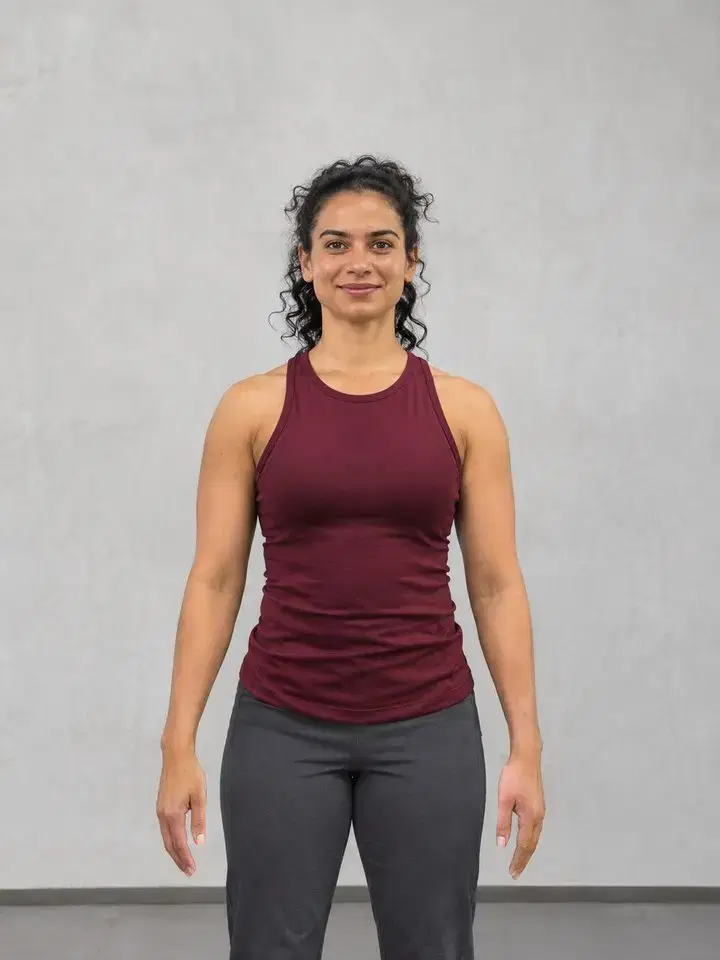
An adult woman in a burgundy workout top stands with relaxed arms and visible hands.
Your starting photo
Bicep Heart result · 5 seconds · Collart Video General

Create Bicep Heart with free credits

New users receive 30 free credits on first sign-in, plus 30 daily credits: 60 on day one. After that, sign in for 30 free credits daily. Collart Video General is available on the Free plan. This Bicep Heart Motion Sync setup at 540p currently shows 50 credits, so an unused first-day allowance covers one attempt; 30 daily credits alone do not. Retries use more credits. Check the editor price, balance and expiry before generating.

Open the Bicep Heart setup and upload one portrait. The motion video, Collart Video General, 540p and one output are already selected. Preview the reference, then check the current 50-credit quote and available balance. Click Generate yourself when ready. Watch the full Bicep Heart result and inspect the fingers before downloading; changing settings or trying again may use additional credits.

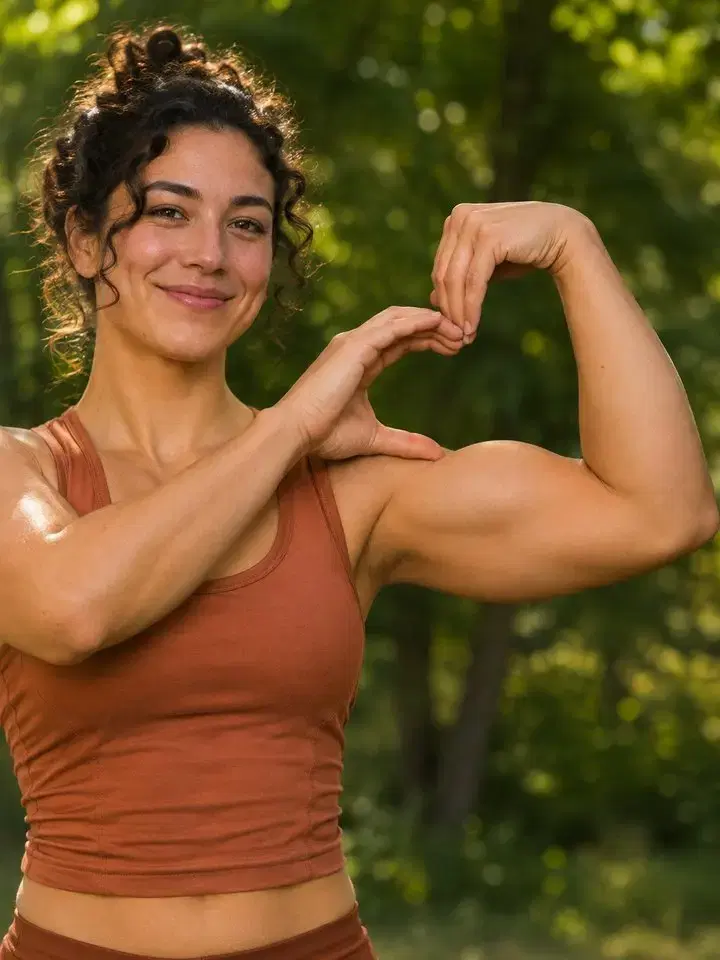
An adult woman bends one arm and curves her opposite hand against her upper arm to demonstrate the Bicep Heart pose.
Pose guide · flex, curve, hold

What makes a Bicep Heart?

The Bicep Heart is an arm pose, not a heart floating over the screen. One arm makes the rounded outside edge; the opposite hand suggests the other half. A clear outline matters more than a large muscle. Keep the movement simple so the shape stays easy to read on a phone.

  1. 01

    Lift one arm

    Start your Bicep Heart with a relaxed shoulder and bend one elbow. Turn the raised wrist inward, open that hand, and point its fingertips down toward your bicep. Keep the upper arm visible and leave room around the elbow. A closed fist cannot make this part of the heart outline.

  2. 02

    Curve the other hand

    Curve the opposite hand into a C to complete the Bicep Heart. Meet its fingertips with those of the raised hand and rest its thumb against the upper arm. Together, the hands and arm enclose the heart-shaped opening. Keep both contact points visible and move slowly enough to see the shape form.

  3. 03

    Hold, then smile

    Pause briefly at the finished Bicep Heart before relaxing. That small hold gives viewers time to recognize the gesture. Keep the camera still and let the expression add personality. A slow, readable performance is a better reference than a rushed transition.

One photo. Motion included.

Prepare your Bicep Heart photo

A good Bicep Heart result begins with compatible inputs. Match the framing of the photo to the reference clip. If one shows only a face while the other shows the whole body, the model has much more to invent.

An adult woman in a burgundy workout top stands with relaxed arms and visible hands.
Your starting photo

Your starting photo

Choose an adult portrait with the face, shoulders and both arms in view. For a Bicep Heart clip, an uncrowded waist-up photo is a useful starting point. Use a picture you own or have permission to edit.

  • Keep the elbows inside the frame, with space above and beside them.
  • Use even light so the hands do not disappear into dark clothing.
  • Pick one clear subject. Avoid crossed arms, foreground objects and heavy blur.
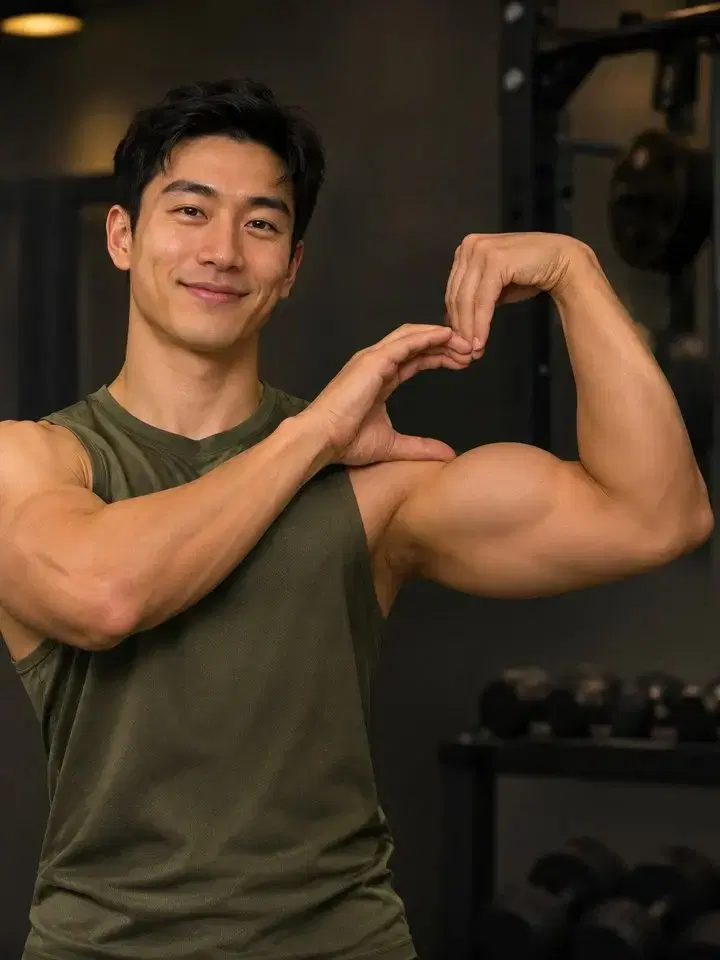
Included motion reference

The Bicep Heart reference is already selected. It moves into the heart pose and holds it so you can see the shape. Preview the Bicep Heart clip and compare its framing with your portrait. You can replace it with a video you own or have permission to use.

  • Watch the hands come together and hold the Bicep Heart pose.
  • Keep both hands visible and use a steady camera without sudden zooms.
  • If you replace this clip, choose one continuous shot without unrelated gestures.

Make the movement yours

Build your Bicep Heart video

The Bicep Heart setup pairs your portrait with our prepared movement. You only need to supply the photo. Motion Sync follows the reference while generating a new clip, so inspect fingers and the shape of the heart before sharing your result.

  1. 01

    Add the photo

    Open Motion Sync and upload your chosen portrait. Check its crop before continuing: a Bicep Heart needs room for the arms, not just a close-up of the face. Replace the image if an elbow is already cut off.

  2. 02

    Preview the included movement

    Check the Bicep Heart video already in the motion slot. Keep the reference if its body direction suits your portrait. You do not need to upload a second image or write a prompt. Changing the reference or model can change the result and price.

  3. 03

    Check settings and generate

    Review the selected model, supported settings and displayed credit cost. Start the Bicep Heart generation when the inputs are ready. Available options can differ by model; do not assume every model uses the same duration or resolution.

  4. 04

    Watch before downloading

    Play the full Bicep Heart clip rather than judging only its first frame. Inspect fingers, elbows, face and clothing throughout the movement. Download your preferred result from your creations, then crop or trim it for your intended post.

Make the Bicep Heart easy to recognize

Review one issue at a time. The most useful Bicep Heart fix is often a clearer input, not a longer instruction. Keep the successful parts of your setup and change only what caused the visible problem.

Follow the opening between fingertips, thumb and bicep.

The fingers merge

For a clearer Bicep Heart hand, try a slower reference with more light and less overlap. Avoid a hand pressed flat against a busy sleeve. Inspect the whole motion again after regenerating; a clean final frame does not prove every frame is clean.

An elbow leaves the frame

Start with a wider photo or re-record the Bicep Heart with more room on each side. Cropping the finished video cannot restore an arm that was missing during generation. Keep the subject at a similar size in both inputs.

The pose is hard to see

Choose a Bicep Heart reference with a longer final hold and a plain background. Remove quick turns and extra gestures. If the hand covers the arm instead of framing it, change the performance rather than adding more effects.

The face or clothing changes

Use a sharp portrait and a Bicep Heart reference with a matching body direction. Fast turns and blocked faces make consistency harder. Compare the opening, middle and final frames, then try a simpler reference if the identity drifts.

Bicep Heart questions

Is there a one-click Bicep Heart template?

There is a prepared Bicep Heart setup: the button selects the motion reference, Collart Video General and 540p. Upload your own photo, check the displayed price, and click Generate when ready. Opening the setup does not start a generation.

Can I make a Bicep Heart from a photo alone?

You only need to upload one photo. The Bicep Heart setup supplies the motion video required by Motion Sync. Use a portrait showing the shoulders, elbows and hands; a tight face crop gives the model too little room. Exact hand placement can still vary.

Does a Bicep Heart video include the trending song?

A Bicep Heart gesture does not come with music rights. Check the audio options in your selected workflow. Add your own audio or a track licensed for your intended platform and use.

Can I make a pet Bicep Heart?

A human Bicep Heart depends on arm and hand anatomy, so this guide focuses on adult portraits. A pet version is a stylized idea rather than a dependable human-pose transfer. Review unusual limbs carefully before sharing.

Is the Bicep Heart generator free?

New users receive 30 free credits on first sign-in, plus 30 daily credits: 60 on day one. After that, sign in for 30 free credits daily. Collart Video General is available on the Free plan. This Bicep Heart Motion Sync setup at 540p currently shows 50 credits, so an unused first-day allowance covers one attempt; 30 daily credits alone do not. Retries use more credits. Check the editor price, balance and expiry before generating.

Give your Bicep Heart a clear starting point

Choose one photo with room for both arms, preview the included Bicep Heart movement, and check the full result before posting. You can keep the prepared reference or replace it with another clip you are allowed to use.