Seedance 2.5 AI Video Generator

Seedance 2.5 AI Video Generator

Seedance 2.5 brings Collart creators native 4K AI video with 30-second single-clip output, expanded reference capacity, and more controllable generation and editing for ads, films, brand stories, and social clips.

  • Native 4K and 30s Single-Clip Output: With Seedance 2.5, generate native AI video clips up to 30 seconds in one segment, with 4K detail suited for campaign review, product shots, and large-screen delivery.
  • Faster Creative Iteration: Move from prompt to review faster, so teams can test camera paths, reference combinations, and alternate edits in one session.
  • Reference-Led Direction: Seedance 2.5 lets you use a much larger set of reference images, videos, and audio cues to guide character look, motion language, scene tone, and pacing.
  • More Controllable Generation and Editing: Direct camera motion, shot intent, scene changes, and edit-style adjustments so each result stays closer to your planned sequence.
  • Built for Longer Story Continuity: Plan clips around consistent characters, wardrobe, lighting, and scene rules when assembling brand stories or short films.
  • Production-Minded Video Workflows: Shape outputs for editing, campaign review, social publishing, and client approval with less cleanup between creative rounds.
  • Multi-Reference Story Beats: Use Seedance 2.5 for scenes where several references need to guide subject identity, environment, motion rhythm, and the story beat in a single generation flow.

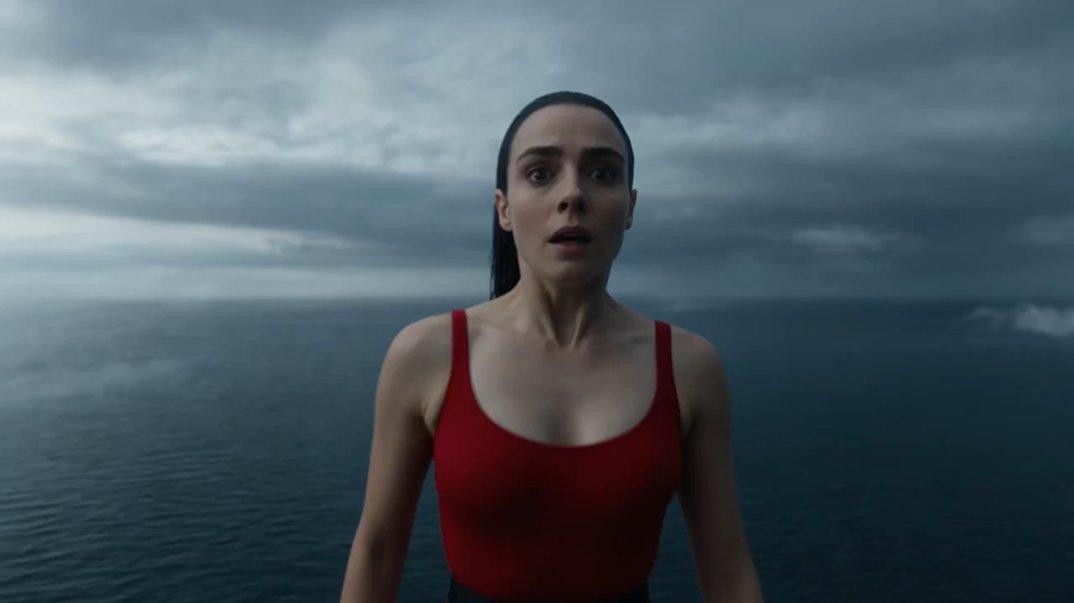
  • Director-Style Camera Paths: Build prompts around shot movement, environment transitions, and pacing so the result feels like a planned camera sequence instead of a single animated still.
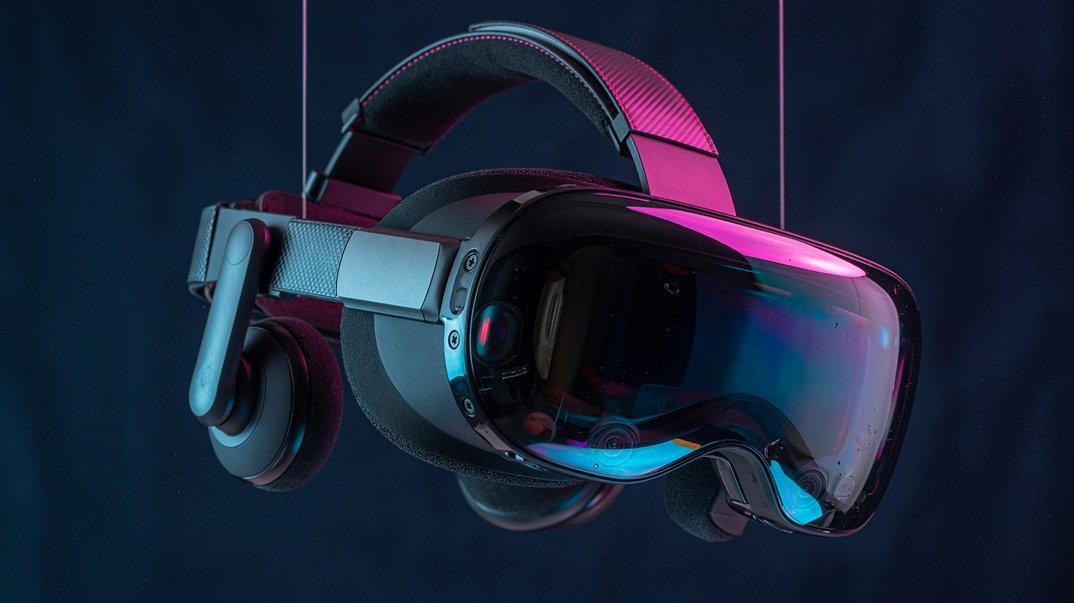
  • High-Detail Commercial Concepts: Seedance 2.5 is a stronger fit for product reveals, premium ads, and brand films where 4K detail, texture, reflections, and lighting need to survive review.
  • Character and Prop Continuity: Plan character-led clips with clear reference tags, wardrobe notes, prop handling, lighting direction, and camera position to reduce drift across a production sequence.

  1. Open the Seedance Workflow: Start from Collart Reference to Video and use the Seedance route this page connects to.
  2. Add Creative References: Upload images, clips, or audio cues you want the model to follow, then tag important assets with @ in the prompt.
  3. Generate and Review in 4K: Create a Seedance 2.5 clip, compare motion and detail, then iterate on camera, pacing, and reference weight for the final output.
Native 4K and 30s single-clip output

Seedance 2.5 AI Video Generator

Seedance 2.5 brings Collart creators native 4K AI video with 30-second single-clip output, expanded reference capacity, and more controllable generation and editing for ads, films, brand stories, and social clips.

Experience Now

Seedance 2.5 Highlights Beyond Seedance 2.0

01 / 4K • Detail

Native 4K and 30s Single-Clip Output

With Seedance 2.5, generate native AI video clips up to 30 seconds in one segment, with 4K detail suited for campaign review, product shots, and large-screen delivery.

02 / Speed • Iteration

Faster Creative Iteration

Move from prompt to review faster, so teams can test camera paths, reference combinations, and alternate edits in one session.

03 / References • Multimodal

Reference-Led Direction

Seedance 2.5 lets you use a much larger set of reference images, videos, and audio cues to guide character look, motion language, scene tone, and pacing.

04 / Shots • Control

More Controllable Generation and Editing

Direct camera motion, shot intent, scene changes, and edit-style adjustments so each result stays closer to your planned sequence.

05 / Continuity • Characters

Built for Longer Story Continuity

Plan clips around consistent characters, wardrobe, lighting, and scene rules when assembling brand stories or short films.

06 / Production • Delivery

Production-Minded Video Workflows

Shape outputs for editing, campaign review, social publishing, and client approval with less cleanup between creative rounds.

Multi-Reference Story Beats

Use Seedance 2.5 for scenes where several references need to guide subject identity, environment, motion rhythm, and the story beat in a single generation flow.

Reference Image
Prompt

Underwater wide shot: an octopus discovers a lost football, calls the group over, then the scene cuts into a playful match on the sea floor with bubbles, coral, and cheering teammates.

Output Video

Director-Style Camera Paths

Build prompts around shot movement, environment transitions, and pacing so the result feels like a planned camera sequence instead of a single animated still.

Reference Image
Prompt

FPV camera follows a woman in a red swimsuit as she falls through dreamlike worlds: storm clouds, underwater ruins, a dark forest, then back into thick cloud cover. Smooth transitions, cinematic realism.

Output Video

High-Detail Commercial Concepts

Seedance 2.5 is a stronger fit for product reveals, premium ads, and brand films where 4K detail, texture, reflections, and lighting need to survive review.

Reference Image
Prompt

Macro product film of a VR headset suspended in a dark studio, cyan and magenta rim lights, slow vertical tilt across the visor, shallow depth of field, premium 4K commercial finish.

Output Video

Character and Prop Continuity

Plan character-led clips with clear reference tags, wardrobe notes, prop handling, lighting direction, and camera position to reduce drift across a production sequence.

Reference Image
Prompt

Shot from above: @image2 sits in the center of the tennis court, matching the pose and mood of @image3. He holds @image1, smiles toward camera, and shares a drink in bright afternoon light with tennis balls scattered nearby.

Output Video

Who Should Watch Seedance 2.5

The strongest Seedance 2.5 angle is not another short-clip generator; it is 4K, faster iteration, and reference-heavy video for teams that need repeatable creative output.

01

4K Social Creators

Ship vertical reels, shorts, creator intros, and high-detail social clips that still look sharp after platform compression.

4K ReelsTikTokShortsFast EditsCreator

02

Ad Creative & Brand Teams

Explore product reveals, campaign variants, and reference-matched brand scenes before the edit suite.

AdsCampaignsProductBrand

03

Filmmakers & Storyboard Artists

Turn beat boards and shot notes into directed clips with stronger camera language and continuity planning.

FilmStoryboardShot DesignCameraContinuity

04

Creative Ops & Workflow Teams

Plan repeatable video production workflows for campaign calendars, review rounds, and multi-asset delivery using Collart's guided creation tools.

WorkflowReviewIterationAssets

05

Music, Fashion & Visual Teams

Build polished clips where rhythm, wardrobe, styling, and scene tone need to stay aligned across every frame.

FashionMusicStylingMotion

4K AI Video Model Comparison

Compare Seedance 2.5, Sora, and Veo around 4K output, iteration speed, reference workflows, and production control.

Dimension
Seedance 2.5
Sora
Veo
Native output
Native 4K output and 30-second single-clip generation are the headline upgrades for sharper, longer review-ready video.
Known for cinematic realism, with resolution and access depending on the product surface.
Strong Google video generation quality, with capabilities varying by version and integration.
Iteration speed
Positioned for faster generation closer to real-time creative review.
Best suited to high-fidelity scene exploration where timing can depend on availability.
Useful for prompt-controlled cinematic drafts inside supported Google workflows.
Reference capacity
Expanded reference material capacity helps images, videos, and audio guide look, motion, scene tone, and timing in one workflow.
Strong scene synthesis from prompts and references, with workflow depending on product access.
Strong prompt control and media-aware generation inside the Gemini and Google ecosystem.
Generation and editing control
More controllable generation and editing fit ads, branded clips, storyboards, and 4K review assets.
Compelling for world-building, realism, and narrative scene generation.
Compelling for cinematic prompt following and broader Google creative tooling.

How to Build Seedance 2.5 Workflows on Collart

Step 1

Open the Seedance Workflow

Start from Collart Reference to Video and use the Seedance route this page connects to.

Step 2

Add Creative References

Upload images, clips, or audio cues you want the model to follow, then tag important assets with @ in the prompt.

Step 3

Generate and Review in 4K

Create a Seedance 2.5 clip, compare motion and detail, then iterate on camera, pacing, and reference weight for the final output.

Frequently Asked Questions

Create 4K AI Video with Seedance 2.5

Experience Now