Generator ng AI Video na PixVerse V4.5

Generator ng AI Video na PixVerse V4.5

Tumutulong ang PixVerse V4.5 AI Video Generator na gumawa ng short-form at cinematic videos mula sa text, images, at references na may character consistency, motion control, lip sync, audio tools, at 4K upscale options.

  • Character Consistency mula sa References: Gumagamit ng reference images at model tools para mapanatiling mas consistent ang characters sa iba't ibang clip.
  • Control ng Galaw gamit ang Magic Brush: Gumagamit ng Magic Brush para gabayan ang local motion paths ng objects, effects, at subjects.
  • Pagkukuwento gamit ang Maraming Shot: Bumubuo ng multi-shot sequences para sa mas mahusay na continuity at short-form storytelling.
  • Native Audio at Lip Sync: Supported ang audio, sound effects, at lip-sync workflows para sa mas kumpletong clips.
  • Cinematic Motion at Visual Quality: Gumagawa ng cinematic motion, lighting, at texture quality para sa social at brand videos.
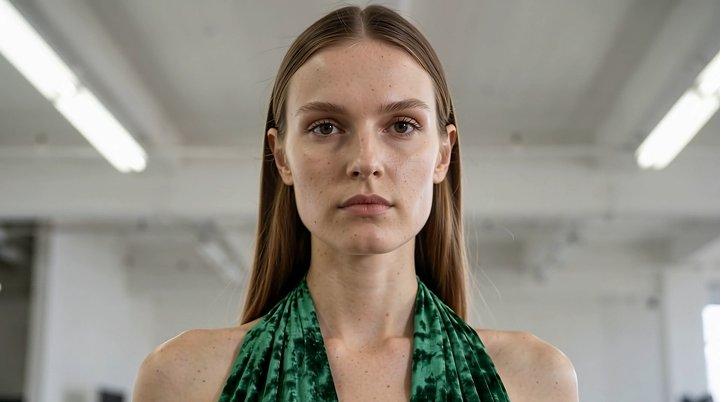
  • Character Consistency mula sa References: Maaaring gumamit ang PixVerse ng image references at character-oriented workflows para mapanatili ang appearance, facial details, at visual continuity sa generated clips.
  • Pagkukuwento gamit ang Maraming Shot: Supported ng PixVerse ang multi-shot generation para sa short narrative sequences, at tumutulong itong panatilihing coherent ang scene logic, pacing, at transitions sa magkakaugnay na shots.
  • Cinematic Motion at Visual Quality: Pinagsasama ng PixVerse ang stylized motion, camera movement, lighting, at texture quality para mabilis na makagawa ang creators ng polished social, anime, at brand video assets.
  1. Piliin ang Model: Pumunta sa Collart AI image generator at piliin ang PixVerse sa model dropdown menu.
  2. Ilagay ang mga Detalye: Ilarawan ang image na gusto mong gawin at i-configure ang customization settings mo.
  3. Gawin ang Iyong Image: I-click ang 'Generate' at maghintay lang ng ilang segundo para ma-download ang image mo.
PixVerse model sa Collart AI

Generator ng AI Video na PixVerse V4.5

Tumutulong ang PixVerse V4.5 AI Video Generator na gumawa ng short-form at cinematic videos mula sa text, images, at references na may character consistency, motion control, lip sync, audio tools, at 4K upscale options.

Subukan Ngayon

Bakit Naiiba ang PixVerse AI Video

01 / Character • Consistency

Character Consistency mula sa References

Gumagamit ng reference images at model tools para mapanatiling mas consistent ang characters sa iba't ibang clip.

02 / Lokal • Tumpak na Control

Control ng Galaw gamit ang Magic Brush

Gumagamit ng Magic Brush para gabayan ang local motion paths ng objects, effects, at subjects.

03 / Tuloy-tuloy • Pagkukuwento

Pagkukuwento gamit ang Maraming Shot

Bumubuo ng multi-shot sequences para sa mas mahusay na continuity at short-form storytelling.

04 / Immersive • Audio

Native Audio at Lip Sync

Supported ang audio, sound effects, at lip-sync workflows para sa mas kumpletong clips.

05 / Mahusay • Sinematiko

Cinematic Motion at Visual Quality

Gumagawa ng cinematic motion, lighting, at texture quality para sa social at brand videos.

Character Consistency mula sa References

Maaaring gumamit ang PixVerse ng image references at character-oriented workflows para mapanatili ang appearance, facial details, at visual continuity sa generated clips.

Reference na Image
Prompt

Nagsimulang maglakad nang mabagal at maingat ang babae sa concrete floor. Humahagod sa likuran niya ang emerald velvet gown at nasasalo ang overhead fluorescent light habang kumukulubot at gumagalaw ang tela. Bahagya niyang itinaas ang baba at nakatitig nang tahimik pero matindi sa unahan. Umuurong ang camera sa dolly habang pinapanatili ang distansya sa paglapit niya. Humahagod sa polished concrete ang train ng damit at dumadaloy ang deep green velvet. Tahimik na nanonood ang crew sa background. Huminto siya, mabagal na inikot ang ulo pakanan sa quarter-profile, saka direktang tumingin sa lens.

Output na Video

Pagkukuwento gamit ang Maraming Shot

Supported ng PixVerse ang multi-shot generation para sa short narrative sequences, at tumutulong itong panatilihing coherent ang scene logic, pacing, at transitions sa magkakaugnay na shots.

Prompt

Isang tribal warrior character na may asymmetrical armor na gawa sa scavenged materials, kabilang ang reptile scales na may iridescent properties, bone fragments na nakatali sa leather, war paint na may finger-stroke detail at bahagyang smudging, scarification patterns na may height-map details para sa tactile realism, at ceremonial wooden mask na may animal motifs at feather at fur attachments na tumutugon sa movement physics.

Output na Video

Cinematic Motion at Visual Quality

Pinagsasama ng PixVerse ang stylized motion, camera movement, lighting, at texture quality para mabilis na makagawa ang creators ng polished social, anime, at brand video assets.

Prompt

Hyper-dynamic at fast-paced action sports shot, high shutter speed, crisp motion, aggressive camera movement. Downhill skateboarding: French woman na naka-full leathers, nakayuko sa hairpin sa Pyrenees; helicopter wide shot na umuurong para ipakita ang buong mountain road, crystal-clear daylight, whip pans, mabilis na rack focus, kinetic energy, punchy contrast, raw documentary realism, walang sparks, lens flares, VFX, o particles, photorealistic.

Output na Video

Performance ng Model

Kumpara sa mas naunang PixVerse workflows, binibigyang-diin ng mas bagong PixVerse models ang mas mahusay na audio, lip-sync, character consistency, multi-shot storytelling, at mas mabilis na short-video production.

Aspeto
PixVerse V4.5
PixVerse V5.5
Pangunahing Positioning
Pagbuo ng materyal sa iisang shot
Buong naratibo / Paglikha ng maikling pelikula
Pagproseso ng Audio
Kailangan ng manual post-dubbing
Native na Audio-Visual Sync (Lip-sync + Sound Effects)
Komposisyon ng Shot
Pangunahing single-shot clips
Awtomatikong multi-shot sequences
Kahusayan sa Pagbuo
Standard na bilis
Malaking pagbilis (Rapid iteration)
Uri ng User
Mga propesyonal na creator / VFX artist
Mga pangkalahatang user / Director ng maikling video

Paano Gamitin ang PixVerse sa Collart

Step 1

Piliin ang Model

Pumunta sa Collart AI image generator at piliin ang PixVerse sa model dropdown menu.

Step 2

Ilagay ang mga Detalye

Ilarawan ang image na gusto mong gawin at i-configure ang customization settings mo.

Step 3

Gawin ang Iyong Image

I-click ang 'Generate' at maghintay lang ng ilang segundo para ma-download ang image mo.

Mga Madalas Itanong

Gawing Kamangha-manghang Visuals ang Iyong mga Ideya

Subukan Ngayon