Grok Imagine AI Video Generator

Grok Imagine AI Video Generator

Gumagawa ang Grok Imagine AI Video Generator ng short videos mula sa text, images, at references na may native audio, 480p/720p options, editable workflows, at mabilis na creative iteration para sa social at cinematic content.

  • Advanced na Consistency ng Maraming Reference: Gumagamit ng reference images para gabayan ang identity, style, at scene consistency.
  • Pisikal na Realismo na Nakatuon sa Galaw: Gumagawa ng stable motion at realistic scene interaction para sa short videos.
  • Propesyonal na Pag-unawa sa Sinematikong Prompt: Sinusunod ang camera, lighting, pacing, at style prompts para sa cinematic output.
  • Text, Image at Reference Workflows: Supported ang text-to-video, image-to-video, editing, extension, at reference-to-video.
  • Advanced na Consistency ng Maraming Reference: Supported ng Grok Imagine ang reference-to-video workflows na gumagamit ng isa o higit pang images para gabayan ang identity, style, at scene content habang gumagawa ng motion mula sa prompt.
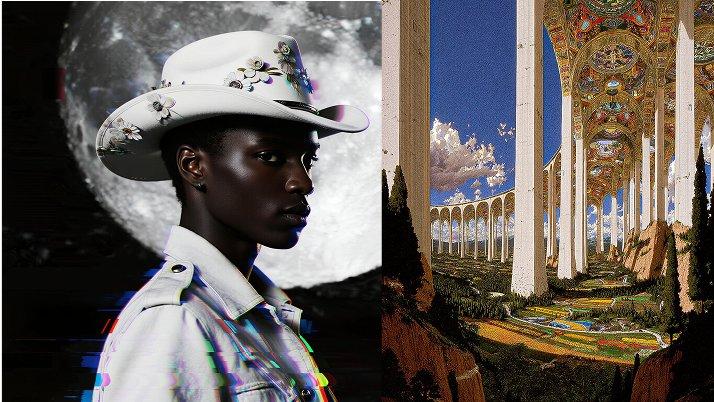
  • Pisikal na Realismo na Nakatuon sa Galaw: Kapaki-pakinabang ang Grok Imagine para sa short motion tests, mabilis na scene previews, at stylized video ideas kung saan kailangang coherent ang object movement, camera direction, at visual rhythm.
  • Propesyonal na Pag-unawa sa Sinematikong Prompt: Tumutugon ang Grok Imagine sa camera at motion language gaya ng zoom, pan, pacing, at lighting direction para magabayan ng creators ang cinematic style gamit ang natural na prompts.
  1. Piliin ang Model: Pumunta sa Collart AI image generator at piliin ang Grok Imagine sa model dropdown menu.
  2. Ilagay ang mga Detalye: Ilarawan ang image na gusto mong gawin at i-configure ang customization settings mo.
  3. Gawin ang Iyong Image: I-click ang 'Generate' at maghintay lang ng ilang segundo para ma-download ang image mo.
Grok Imagine model sa Collart AI

Grok Imagine AI Video Generator

Gumagawa ang Grok Imagine AI Video Generator ng short videos mula sa text, images, at references na may native audio, 480p/720p options, editable workflows, at mabilis na creative iteration para sa social at cinematic content.

Subukan Ngayon

Bakit Naiiba ang Grok Imagine AI Video

01 / Reference • Consistency

Advanced na Consistency ng Maraming Reference

Gumagamit ng reference images para gabayan ang identity, style, at scene consistency.

02 / Galaw • Physics

Pisikal na Realismo na Nakatuon sa Galaw

Gumagawa ng stable motion at realistic scene interaction para sa short videos.

03 / Prompt • Sinematiko

Propesyonal na Pag-unawa sa Sinematikong Prompt

Sinusunod ang camera, lighting, pacing, at style prompts para sa cinematic output.

04 / Paglikha • Mga Mode

Text, Image at Reference Workflows

Supported ang text-to-video, image-to-video, editing, extension, at reference-to-video.

Advanced na Consistency ng Maraming Reference

Supported ng Grok Imagine ang reference-to-video workflows na gumagamit ng isa o higit pang images para gabayan ang identity, style, at scene content habang gumagawa ng motion mula sa prompt.

Reference na Image
Prompt

Naglalakad ang lalaking ito sa kalsadang ito sa pagitan ng mga column

Output na Video

Pisikal na Realismo na Nakatuon sa Galaw

Kapaki-pakinabang ang Grok Imagine para sa short motion tests, mabilis na scene previews, at stylized video ideas kung saan kailangang coherent ang object movement, camera direction, at visual rhythm.

Prompt

Extreme close-up, dolly in habang ibinubuhos ang dark espresso sa puting ceramic cup na may gatas. Lumilikha ng realistic turbulence at maliliit na bubbles ang paikot na galaw ng coffee habang humahalo sa milk. High frame rate, macro photography, natural soft window lighting.

Output na Video
Prompt

Slow-motion footage ng makulay na water balloon na tinutusok ng matulis na karayom. Nananatili ang hugis ng balloon sa tubig sa maikling sandali bago ito sumabog palabas bilang realistic splash. Sharp focus, malinaw na outdoor daylight, high-speed camera aesthetic.

Output na Video

Propesyonal na Pag-unawa sa Sinematikong Prompt

Tumutugon ang Grok Imagine sa camera at motion language gaya ng zoom, pan, pacing, at lighting direction para magabayan ng creators ang cinematic style gamit ang natural na prompts.

Zoom In
Dolly Out
Pan Right

Paano Gamitin ang Grok Imagine sa Collart

Step 1

Piliin ang Model

Pumunta sa Collart AI image generator at piliin ang Grok Imagine sa model dropdown menu.

Step 2

Ilagay ang mga Detalye

Ilarawan ang image na gusto mong gawin at i-configure ang customization settings mo.

Step 3

Gawin ang Iyong Image

I-click ang 'Generate' at maghintay lang ng ilang segundo para ma-download ang image mo.

Mga Madalas Itanong

Gawing Kamangha-manghang Visuals ang Iyong mga Ideya

Subukan Ngayon