Smartphone POV Fantasy Stage Battle
Beschrijving
An extremely detailed prompt for a vertical smartphone-style video of a fantasy duel between a Wyrm Guardian and a Ninja.
Volledige prompt
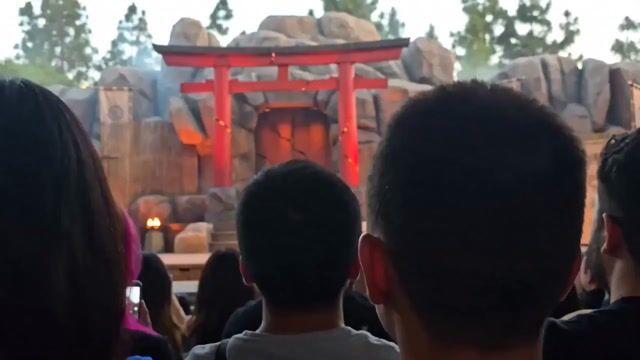
Audience-POV realistic smartphone video of an original fantasy outdoor stage performance. The footage is filmed vertically from inside a crowded live audience, with the phone held slightly above people’s heads. The frame has natural handheld sway, small breathing movement, brief focus hunting, mild digital noise, compressed phone microphone sound, ordinary smartphone exposure, and crowd silhouettes blocking the lower edge of the frame.
The stage is a large wooden outdoor performance platform built as a fictional mountain shrine arena: a cracked red shrine gate at the back, carved stone dragon statues on both sides, bamboo fencing, hanging cloth banners with invented calligraphy, dark wooden steps, sculpted rock formations, small ember bowls near the stage corners, and thin theatrical mist drifting behind the set. Tall trees and pale afternoon sky are visible beyond the stage. Audience members fill the foreground with dark hair silhouettes, raised phones, small cameras, and occasional hands pointing toward the stage.
Two original fantasy performers face each other on stage.
On frame-left stands the Crimson Scale Wyrm Guardian: a tall male dragon-humanoid stage performer with a strong athletic build, deep bronze skin visible around the jaw and hands, short backward-curving dark red horns, subtle cheek-scale prosthetics, amber glowing contact lenses, and layered crimson scale armor made of matte leather plates. He wears a heavy dark waist sash, black stage boots, a short thick dragon-tail costume piece attached behind the armor, and a long blackened spear with a red ember-like tip. His movement feels heavy, grounded, and ceremonial, like an ancient fire guardian entering combat.
On frame-right stands the Shadow-Reed Ninja: a lean young stage performer with quick controlled movement, ash-black layered ninja clothing, dark green cloth wraps around the forearms, a plain charcoal hood, a half-face fabric mask, soft split-toe stage boots, and two short curved matte-black blades. A narrow strip of deep green fabric trails from his back and moves with each step. His movement feels light, precise, and tactical, like a forest assassin using speed and misdirection.
0s to 4s: The phone camera rises slightly above the crowd as the audience reacts to the two performers entering their fighting marks. The Crimson Scale Wyrm Guardian steps forward from frame-left with slow weighty footwork, the spear tip dragging once across the wooden stage and creating a brief orange ember spark from a hidden stage effect. The Shadow-Reed Ninja lowers his stance on frame-right, turns one shoulder toward the dragon warrior, and shifts his blades into a crossed defensive position. The audience grows quieter for a moment, then a few people cheer as both performers begin circling toward center stage.
4s to 7s: The ninja moves first with two fast but readable diagonal blade strikes. The dragon warrior blocks the first strike with the spear shaft, turns his armored shoulder into the second strike, then answers with one broad horizontal spear sweep. The ninja ducks under the sweep, slides one foot across the stage, and lets the trailing green cloth flick behind him. Their weapons meet at center stage with a staged metallic clack. A small controlled dust burst rises from the floorboards around their boots. The phone camera jolts slightly as people in front lift their phones higher.
7s to 10s: The duel shifts into a fantasy stage illusion. The dragon warrior plants the spear into the stage with both hands, lowers his head, and the red glow inside his chest armor brightens from hidden LEDs. Thin orange smoke vents from the spear tip and curls upward. The ninja steps backward into a shadowed patch near the bamboo fence, flicks both blades outward, and two black silk ribbons snap open behind him like fast-moving shadow wings pulled by stage wires. The crowd gasps. The camera tries to keep both performers in frame, drifting slightly left then correcting back to center.
10s to 13s: Both performers charge toward the center mark in a controlled stage-combat rhythm. The dragon warrior drives the spear forward with a heavy two-handed thrust while the ninja spins aside and crosses both blades near the spear tip. At the exact contact point, a practical stage flash pops low to the floor, followed by a ring of dry leaves and dust pushed outward by a hidden air burst. The dragon warrior holds a powerful low stance, armor still glowing red. The ninja lands in a crouched side stance, one blade forward, one blade behind. The two freeze in a final dramatic face-off as the audience erupts into cheers, applause, whistles, and raised phones shaking in the foreground.
Camera behavior: continuous handheld smartphone POV from the audience, raised above shoulder level, slightly unsteady but physically grounded. The camera never becomes a professional cinematic camera. It keeps the crowd silhouettes in the lower foreground, occasionally catches nearby phone screens, and follows the performers with natural human reaction timing. The framing stays mostly medium-wide so the full stage combat remains readable, with brief focus hunting when the stage flash occurs.
Lighting: natural late-afternoon daylight from above and slightly frame-right, mixed with warm red practical stage lights hidden inside ember bowls, the dragon chest armor, and the spear tip. The ninja stays slightly cooler and darker near the bamboo-shadow side of the stage. The stage flash briefly lifts exposure on the center floorboards and nearby dust, then the image returns to ordinary phone-camera contrast.
Audio: live outdoor crowd ambience, phone microphone compression, excited audience voices close to the camera, wooden stage footwork, leather armor creaks, cloth ribbon snaps, staged metal weapon clacks, a low ember hiss from the dragon spear effect, a short smoke vent burst, one floor-level flash pop, dry leaves scattering, and loud applause at the final freeze pose.
Keep the Crimson Scale Wyrm Guardian’s horns, cheek scales, amber eyes, crimson scale armor, blackened spear, tail costume piece, heavy movement rhythm, and frame-left origin stable throughout. Keep the Shadow-Reed Ninja’s charcoal hood, half-face mask, ash-black outfit, dark green arm wraps, twin short blades, trailing green fabric, light movement rhythm, and frame-right origin stable throughout. Keep the shrine gate, stone dragon statues, bamboo fencing, ember bowls, wooden floorboards, audience silhouettes, phone POV, daylight direction, red stage glow, weapon scale, and final center-stage face-off consistent from start to finish.
Preserve original fantasy character identity, readable stage choreography, practical live-show effects, stable costume shapes, clear weapon positions, natural hand anatomy, believable body weight, consistent performer scale, grounded audience-camera movement, ordinary smartphone contrast, mild digital noise, realistic crowd reactions, and physically motivated fantasy stage spectacle.