Party Sheep Character Sheet
Beskrivelse
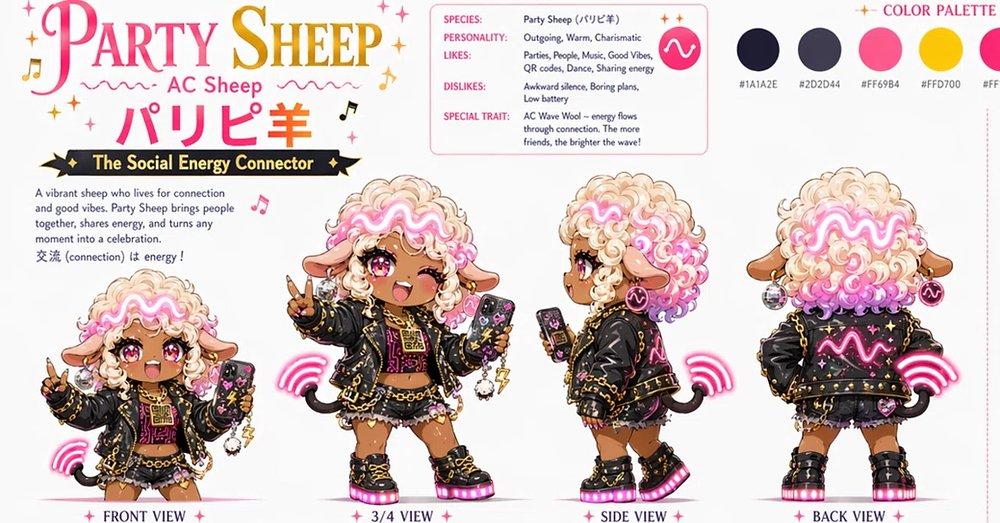
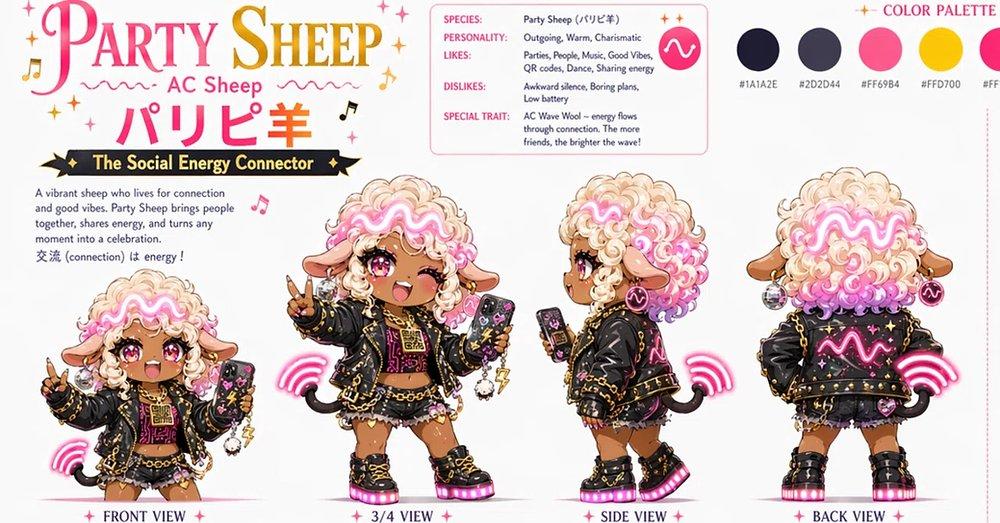
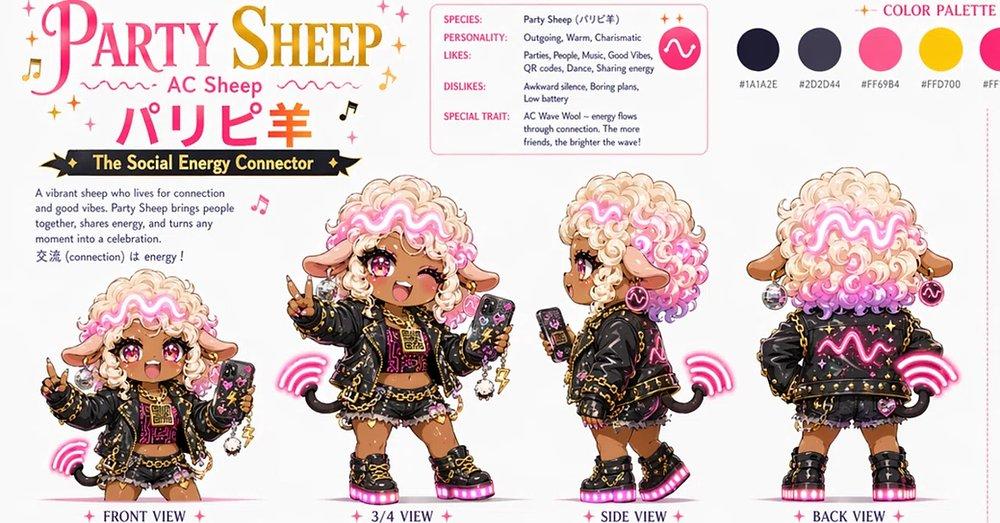
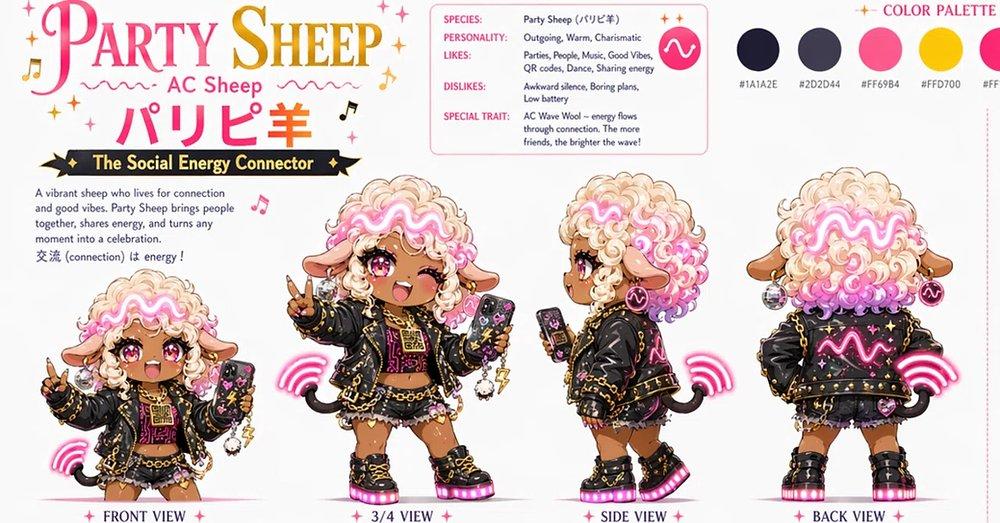
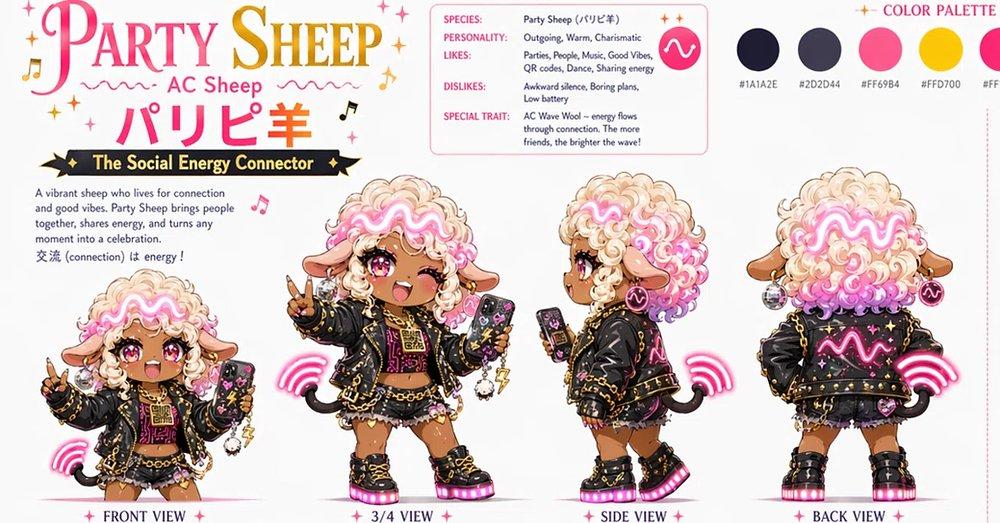
Generates a vibrant anime chibi mascot turnaround sheet with profile details, palette swatches, and party-themed sheep character branding.
Fuld prompt
Goal: Create a colorful kawaii character design sheet for Party Sheep, an energetic social mascot themed around music, connection, and party vibes. Canvas: Wide horizontal character sheet, approximately 16:9, white background with pink and gold sparkles, music notes, tiny stars, and playful decorative flourishes. Use a polished anime/chibi concept-art style with clean linework, glossy highlights, soft shading, and sticker-like presentation. Top-left title area: Large decorative headline text reading “PARTY SHEEP” in a pink-to-gold elegant serif display font, with small sparkles and music notes around it. Under it, smaller text “AC Sheep”, then large Japanese text “パリピ羊” in bright pink. Beneath that, a black ribbon banner with gold trim reading “The Social Energy Connector”. Add a short description block: “A vibrant sheep who lives for connection and good vibes. Party Sheep brings people together, shares energy, and turns any moment into a celebration. 交流 (connection) is energy!” Top-center profile card: Rounded rectangle outline in soft pink containing exactly 5 labeled rows: 1) SPECIES: Party Sheep (パリピ羊), 2) PERSONALITY: Outgoing, Warm, Charismatic, 3) LIKES: Parties, People, Music, Good Vibes, QR codes, Dance, Sharing energy, 4) DISLIKES: Awkward silence, Boring plans, Low battery, 5) SPECIAL TRAIT: AC Wave Wool -- energy flows through connection. The more friends, the brighter the wave! Include a round pink icon with a white glowing wave symbol inside the card. Top-right color palette: Add the heading “COLOR PALETTE” in pink. Show exactly 5 circular color swatches in a row with small hex labels beneath them: 1) very dark navy “#1A1A2E”, 2) charcoal purple “#2D2D44”, 3) hot pink “#FF69B4”, 4) golden yellow “#FFD700”, 5) pale white or cream accent, partially near the right edge. Main character: A chibi sheep girl mascot with tan skin, big glossy magenta eyes, one eye winking in some views, fluffy cream wool hair with vivid pink curls and a glowing neon pink wave pattern across the bangs. She has sheep ears, tiny horns hidden in the curls, a cheerful open-mouth smile, and a short black sheep tail. Outfit: black oversized party jacket with gold studs, chains, star patches, pink neon wave graphics, black crop top, small skirt or shorts with frills, chunky black platform boots with hot-pink glowing soles, gold jewelry, hoop earrings, bracelets, charms, and a small phone or QR-code accessory. The character should feel charismatic, social, and musical, with bright pink wireless signal arcs around her. Character turnaround layout: Show exactly 4 full-body chibi views along the bottom, each labeled in pink with small sparkles: 1) FRONT VIEW at far left, smaller pose holding up a peace sign and a phone, 2) 3/4 VIEW left-center, largest pose winking, smiling, holding a smartphone, and making a peace sign, 3) SIDE VIEW right-center, profile pose holding a phone, showing the fluffy wool volume and jacket details, 4) BACK VIEW at far right, showing the back of the jacket with neon wave graphic, fluffy pink-and-cream wool, tail, boots, and pink signal arcs. Visual style: Cute Japanese character sheet, polished mascot audition artwork, high-energy idol-streetwear aesthetic, crisp readable typography, bright pink and gold accents, clean white negative space, balanced layout. Constraints: Keep the exact 4-view turnaround and the exact 5-row profile card. Keep all visible English and Japanese text legible. Do not add extra characters, extra views, watermarks, logos, or realistic rendering.